

- Company
- Profile Guide
- How to Open a Brokerage Account
How to Open a Brokerage Account
Opening a live trading account with IFC Markets takes just a few minutes. Once registered, you can create and manage multiple live accounts directly from your personal profile — each with your choice of trading platform and account parameters. Follow the steps below to open your first or next live account.
1. Press Login
Go to IFC Markets and click the Login button.

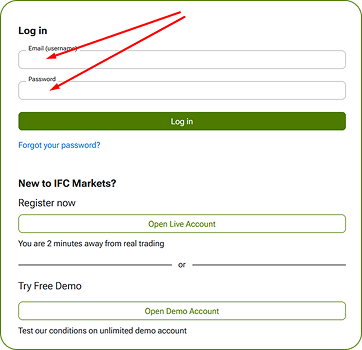
2. Enter your email and profile password
Enter your email and profile password (which you created during registration) and click “Log in”.
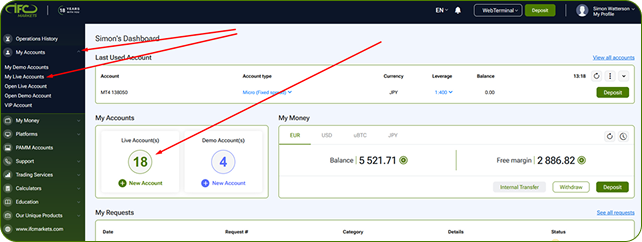
3. In your Profile press “My Accounts”
In your Profile press “My Accounts” - “My Live Accounts” or click the Widget on the Dashboard.
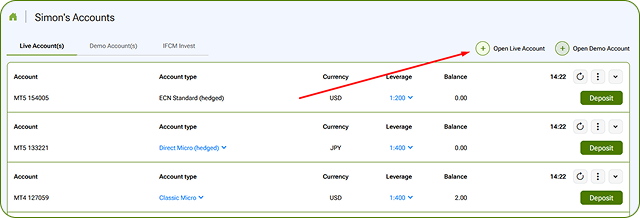
4. Click “Open Live Account”.
On the My Live Accounts page, click the Open Live Account button to begin the account creation process.
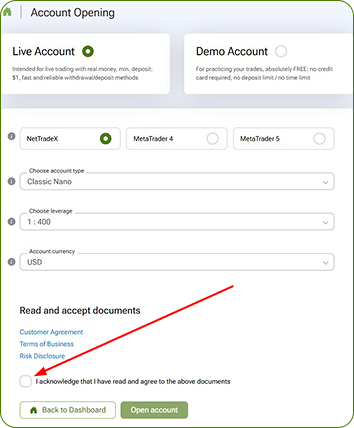
5. Choose the trading platform
Choose the trading platform, select account parameters, fill the box “I acknowledge...” and click “Open account” button
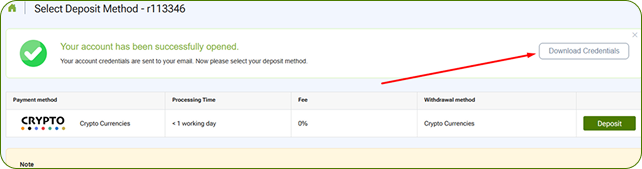
6. Download your account credentials
Your account is opened. Please download your account credentials, or find them in your email box. The subject of the message is "New trading account"
7. Save your trading account details
Please save your trading account details in a secured place.
Video on How to Open a New Account
Go to the video page to watch How to open a new account.