

- Trading Platforms
- Platforms
- User Manuals
- MetaTrader 4 User Guide
- How to Open MT4 Real Account
How to Open Real Account in MetaTrader 4
To Open a Real MT4 account, from your “Profile” in the “Accounts” tab, select the "Open a real account” section. Then, an "Open Account (Demo / Real)" window will be open, make sure that the “Real Account” option is selected and fill in the following fields:
- Platform - Select “MetaTrader 4”;
- Select an account type - “Micro” or “Standard”. For more information, please, visit the "Account Types" page in the “Trading Conditions” section on the company’s website;
- Leverage – leverage size may vary from 1: 1 to 1: 400;
- Account currency - for MetaTrader 4 accounts, the account balance can exist in US dollars, euros or Japanese yens.
- Read the documents and accept the conditions - you should read the Client Agreement, Trading Terms and Conditions and the Risk Disclosure and tick "I acknowledge that I understand and agree to the above documents."
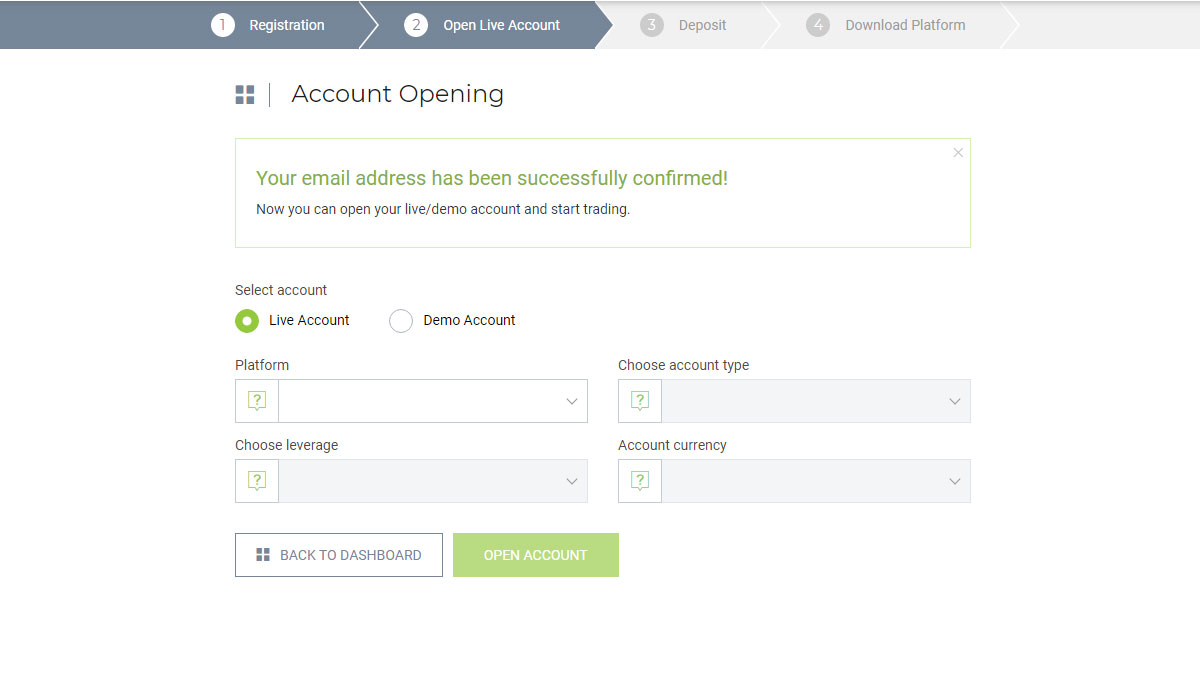
Your new account will be opened immediately. Account parameters will be sent to your email address right away after opening an account.
Open Account MetaTrader 4Discover the benefits of Forex & CFD trading with IFC Markets
650+ Instruments
- Currencies | Stocks | Indices | Commodities | Metals | ETF | Crypto Futures
- Personal Composite Instruments (PCI)
Best Execution
- Super tight fixed spreads
- Instant execution
Trading Opportunities
- Create & trade own instruments
- Choose ready synthetic instruments from PCI Library
Advanced Trading Platforms
- NetTradeX - own advanced platform
- Popular MT4, МТ5 & WebTerminal
Everywhere & Anytime
- Qualified online support in 19 languages
- 24 hours a day